


Connection not protected: Kaspersky Antivirus
Getting this?
Connection not protected
The security of your connection is reduced. Criminals can attempt to steal your data from the website. You are advised to leave this website.
For regular web traffic, this is normal. But if you want to avoid this for a local HTTPS server you're running, then these are the steps you want to take to disable this:
- In Kacpersky Total Security, click the Cog Wheel near the bottom left.
- Next, select Protection then Application Control from the right side.
- Click on Manage Applications
- Type the browser you would like to modify in the top right search box.
- Double click the browser app and click the Exclusions tab
- Click on Do not scan all traffic
- Select the checkbox Only for specific IP addresses
- Type in the addresses.
- Save the settings
Example of what this look like:
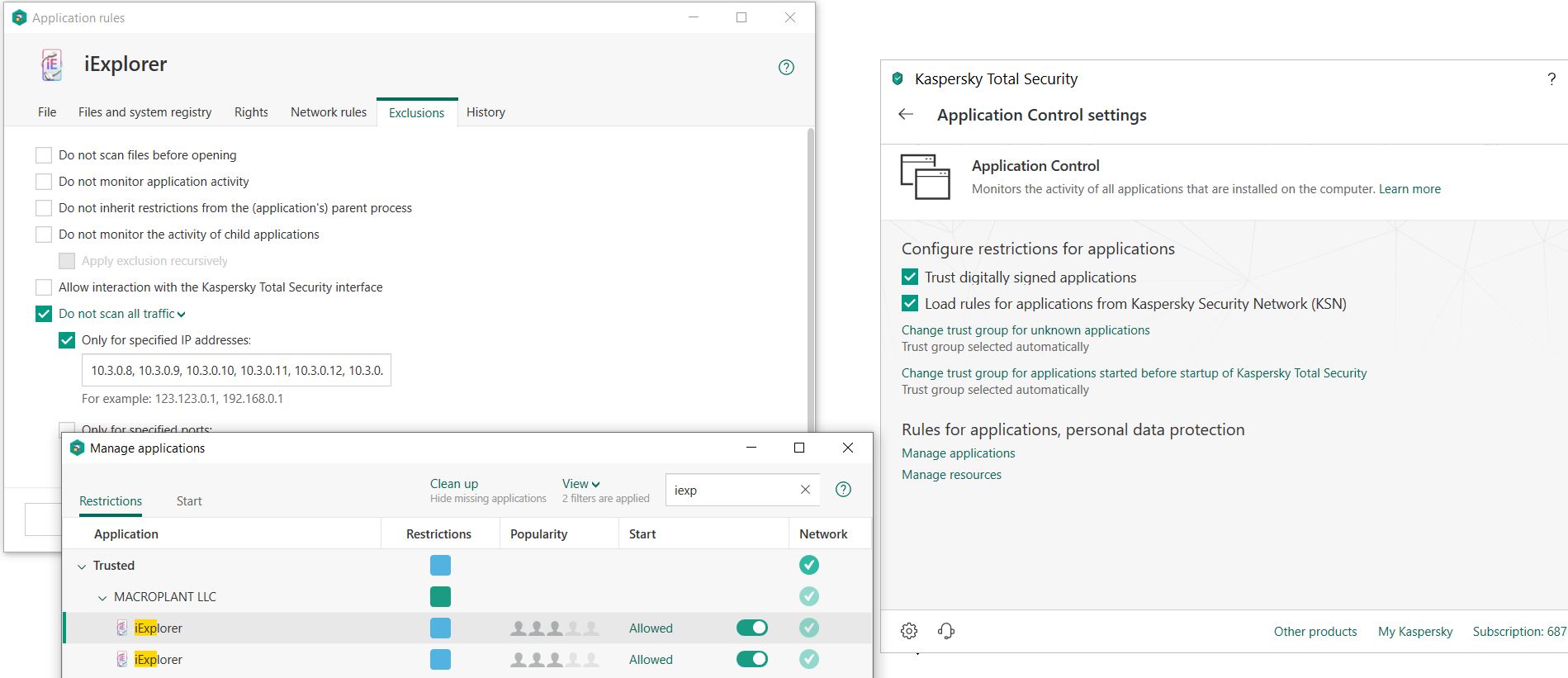
NOTE: Above screenshots shows a sample application. It should really be Microsoft iExplorer, Firefox or Chrome if those browsers are being used.
Thx,
EJ

